
A local business website has one job: turn people nearby who are looking for what you do into calls, bookings and enquiries. It needs to show up in search, load quickly on a phone and make the next step obvious.
This guide covers what good local business website design looks like in practice: what the site needs, the design principles that help it convert, the local SEO basics that help it get found, and how to tell whether it’s working. There’s a checklist near the end you can run against your own site.
Table of Contents
What a Local Business Website Needs to Do
Most people who land on a local business website want to answer a few quick questions. Do you offer what I need? Do you cover my area? Can I trust you? How do I get in touch, and when are you open?
If the site answers those questions fast, it does its job. If visitors have to hunt for a phone number or guess whether you serve their postcode, many will go back to the search results and pick someone else.
A conversion is any action that matters to the business: a call, a form, a booking, a request for directions. Your conversion rate is the share of visitors who take one.

Understanding Your Target Audience
Before you think about colours or layouts, be clear about who you’re building for:
- Who are your customers? Young professionals, parents, retirees, other businesses? This shapes everything from tone of voice to which services you put first.
- What problem brings them to you? A burst pipe needs a phone number right now. Someone choosing a wedding venue wants photos, prices and a way to arrange a visit.
- Where are they? List the towns, neighbourhoods or postcodes you actually serve. You’ll need this for your content and your local SEO.
Writing these answers down gives you a simple buyer persona. You can then check every page against it: does this help that person decide to get in touch?
Local Business Website Design: The Principles That Matter
Good design for a local business is mostly about removing friction. These are the things that make the biggest practical difference.
Clear Calls to Action (CTAs)
If someone can’t work out what to do next, they’ll leave. Decide on your main action (call, book, request a quote) and make it obvious with a clear button such as “Book Now”, “Get a Free Quote” or “Call Us”.
- Near the top of the page: visitors shouldn’t need to scroll to find the main action.
- After key content: repeat it after you describe a service, after testimonials and in the footer.
- On mobile: make phone numbers tap-to-call, and consider a sticky call or book button.
EXAMPLE:
Simple, Clean Design
A cluttered website is like walking into a messy shop: people don’t know where to look. With web design for local businesses, simple usually wins. Use a clean layout, a consistent colour scheme that matches your brand, and plenty of white space so each section has room to breathe.
Keep navigation short and predictable. Home, Services, About, Reviews and Contact covers most local businesses. Use real photos of your team, premises and work wherever you can.
Mobile-Friendly/Responsive Design
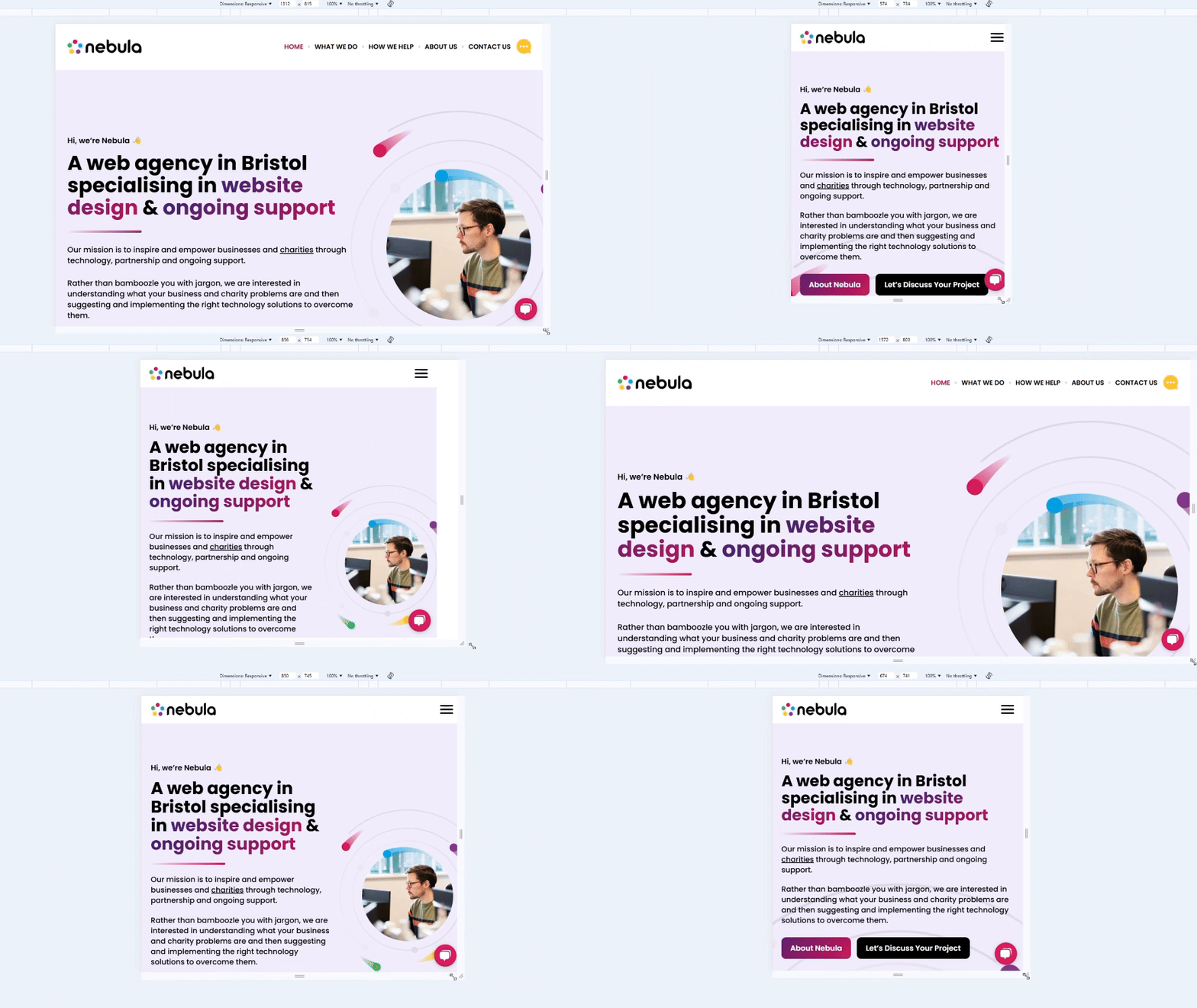
A lot of local searches happen on phones, often when someone needs help quickly. Your site has to work just as well on a small screen as on a desktop: readable text without zooming, buttons big enough to tap, and forms that are easy to fill in with a thumb. Google also indexes the mobile version of your site, so a poor mobile experience can hold back your rankings too.
Fast-Loading Pages
Slow pages frustrate visitors and can count against you in search. The usual culprits are oversized images, too many plugins or scripts, and cheap hosting.
You can test any page for free with Google’s PageSpeed Insights. Pay most attention to the mobile results. Scores vary between tests, so treat them as a guide to what needs fixing rather than a target.
Write Like a Human
Nobody wants to read a wall of jargon. Write the way you’d talk to a customer: plainly, directly and about their problem, not your company history. Short paragraphs and clear headings help people scan.
Instead of saying, “Our landscaping services are highly efficient and cost-effective,” try, “We’ll make your garden look stunning without costing you a fortune.”
Contact Details Front and Centre
Put your phone number in the header, and your address, opening hours and service area on every page (the footer is fine). Add a short contact form and an embedded map if customers visit you in person.
SEO Essentials for Local Businesses
A well-designed site still needs to be found. Search engine optimisation (SEO) is a series of practices that help search engines understand and trust your website. For a local business, the aim isn’t to rank everywhere. It’s to appear in front of people nearby, in both the normal results and the map listings.
Google Business Profile
Your Google Business Profile is what appears in Google Maps and the local “map pack”. It’s free, and for many local businesses it’s as important as the website itself. Claim and verify it, choose the most accurate primary category, and fill in your hours, phone number, services, service area and photos. Link it to your website, ideally to the most relevant page.
Google says local results are based mainly on relevance, distance and prominence. You can’t change distance, but a complete, accurate profile and a strong website help with the other two.
Consistent Name, Address and Phone (NAP)
Your business name, address and phone number should be written exactly the same way on your website, your Google Business Profile and any directories you’re listed in. Mismatches, such as an old address or a different phone number, make it harder for search engines and customers to trust which details are right. If you move or change number, update everything.
Service and Location Pages
Give each main service its own page rather than listing everything on one. A page about “boiler servicing” has a far better chance of ranking for that search than a general “Services” page.
Mention the places you serve naturally: “boiler servicing in Bristol and North Somerset” rather than just “boiler servicing”. If you genuinely serve several distinct areas, separate location pages can help, but only if each has something genuinely specific to say. Near-identical pages with the town name swapped are likely to do more harm than good.
LocalBusiness Schema
Schema markup is structured data that tells search engines the key facts about your business. For local businesses, that means LocalBusiness schema (or a more specific type, like Dentist or Plumber) including your name, address, phone number, opening hours and website. On WordPress, SEO plugins can usually add this for you. You can check it with Google’s free Rich Results Test.
Reviews and Testimonials
People trust other people. Reviews on your Google Business Profile help you stand out in local results, and testimonials on your website help visitors decide. Ask happy customers for a review, make it easy with a direct link, and reply to reviews, including the negative ones, politely.
Keep it honest. Don’t offer incentives for reviews, which Google’s policies don’t allow, and never post fake ones. Fake reviews are now explicitly banned under UK consumer law.
Page Titles and Meta Descriptions
Each page’s title and meta description are often what people see in search results. Make every title unique, say what the page is about, and include the location where it fits (“Emergency Plumber in Bristol | Smith & Sons”). A clear meta description won’t directly boost rankings, but it can persuade more people to click.
Adding Trust Elements
Visitors need to trust a business before they hand over their details or their money.
SSL Certificate
An SSL certificate encrypts the connection between your site and its visitors, and gives you the padlock and “https” in the address bar. Without one, browsers like Google Chrome may show a “Your connection is not private” warning, which will put most people off.
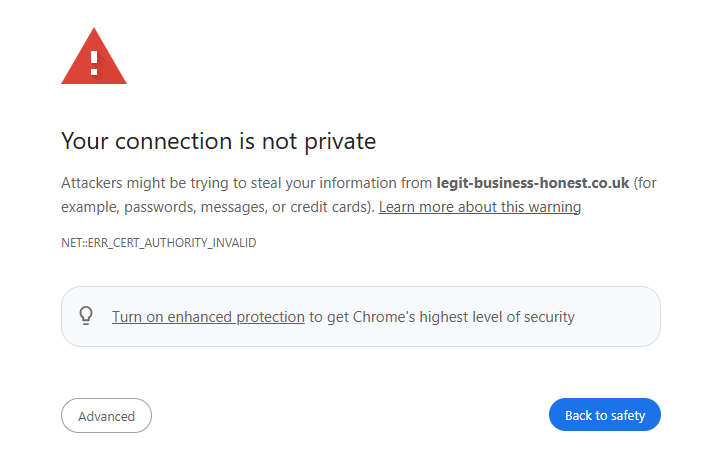
Most website hosts include a free SSL certificate, so this should be a quick fix if it’s missing.
Showcase Awards, Certifications and Partnerships
Trade accreditations, professional memberships, insurance, awards and local partnerships all reassure people. Show the relevant ones on your homepage and service pages, and link to them where you can.
Make Enquiries Easy, Then Track Them
Reduce the effort it takes to get in touch. Keep forms short (name, contact details and a message is often enough), and if you take appointments, an online booking system can save a lot of back and forth.
Then measure what happens. Without tracking, you’re guessing whether the website is doing anything. As a minimum:
- Set up Google Analytics 4 and record form submissions, phone link clicks and bookings as key events.
- Check your Google Business Profile performance figures for calls, website clicks and direction requests.
- Ask new customers how they found you, and note it down.
- Use a behaviour tool like Microsoft Clarity to see where people get stuck.
Local Business Website Checklist
Run through this list against your current site, or use it as a brief for a new one:
- The homepage says what you do and where, within the first screen.
- There’s one clear main call to action, repeated down the page.
- Phone numbers are tap-to-call on mobile.
- Address, opening hours and service area are easy to find.
- Name, address and phone number match your Google Business Profile exactly.
- Your Google Business Profile is claimed, complete and links to your site.
- Each main service has its own page that mentions the areas you cover.
- LocalBusiness schema is in place and passes Google’s Rich Results Test.
- Reviews or testimonials appear on key pages.
- The site works well on a phone and loads quickly on mobile.
- The site runs on HTTPS with a valid SSL certificate.
- Forms are short and send you a notification you’ll actually see.
- Enquiries are tracked in Google Analytics.
Conclusion
A local business website that converts isn’t magic. It’s a clear message, an obvious next step, a fast mobile experience and the local SEO basics done properly.
The same principles apply to local charities and community organisations. Swap “customers” for supporters, volunteers or the people you help, and “enquiries” for donations, sign-ups or referrals. If that’s you, our charity web design page explains how we approach it.
We build sites like this on WordPress, which gives you full ownership and room to grow. You can read more about our WordPress development work, or book a discovery call for an honest chat about your current site.
Local Business Website FAQs
How much does a local business website cost in the UK?
It varies a lot depending on who builds it and what it needs to do. As a rough guide, DIY website builders typically cost a monthly subscription, a simple template-based site from a freelancer often runs from several hundred to a couple of thousand pounds, and a custom-designed agency site is usually several thousand pounds or more. Remember to budget for hosting, maintenance and updates too.
Do I need SEO for a local business website?
Yes, at least the basics. A well-structured site, a complete Google Business Profile, consistent contact details and a page for each service go a long way. You don’t necessarily need an ongoing SEO contract, especially in a less competitive area.
How long does it take for a new website to bring in enquiries?
Visitors who already know your name, or who find you through your Google Business Profile, can start converting straight away. Ranking for competitive local searches usually takes longer, often several months, and depends on your competition and how much useful content you add.
Can I use a website builder or template?
For a very small business just getting started, a builder or template can be a sensible first step. The principles in this guide still apply. As you grow, you may want more control over speed, SEO and features, which is where a properly built WordPress site tends to pay off.